
Navigating government paperwork can feel overwhelming, especially when it involves major life events. I recently visited the Zone 5 Greater Chennai Corporation (GCC) Office in Royapuram to handle two distinct tasks: adding a baby’s name to a birth certificate and correcting a spelling mistake on a death certificate.
Here is the complete, practical guide based on my personal experience, detailing the documents you need, the best times to visit, and the common mistakes to avoid.
Part 1: Chennai Corporation Birth Certificate Baby Name Inclusion
My child was born at the Government Children’s Hospital in Egmore. Upon discharge, the hospital authorities handed us a baby name inclusion form. They explicitly told us that we should fill this out after the naming ceremony and return it to the hospital within one month.
The One-Month Rule
- Within 30 Days: If you submit the filled form back to the hospital within a month of birth, the hospital staff updates the baby’s name directly in the system. You can later download the named certificate from the GCC website for free.
- After 30 Days: If you miss this one-month window, the hospital can no longer process it. You will have to physically visit your designated Chennai Corporation Zonal Office to manually apply for the name inclusion.
Does the Royapuram Office Handle Your Record?
The Royapuram Zonal Office (Zone 5) processes birth and death records specifically for these major government hospitals:
- Government Children’s Hospital, Egmore
- Rajiv Gandhi Government General Hospital (RGGGH)
- Omandurar Government Multispeciality Hospital
Pro-Tip: Before traveling, always look at the bottom-right corner of your child’s initial blank birth certificate to confirm your correct zonal office.
Step-by-Step at the Counter
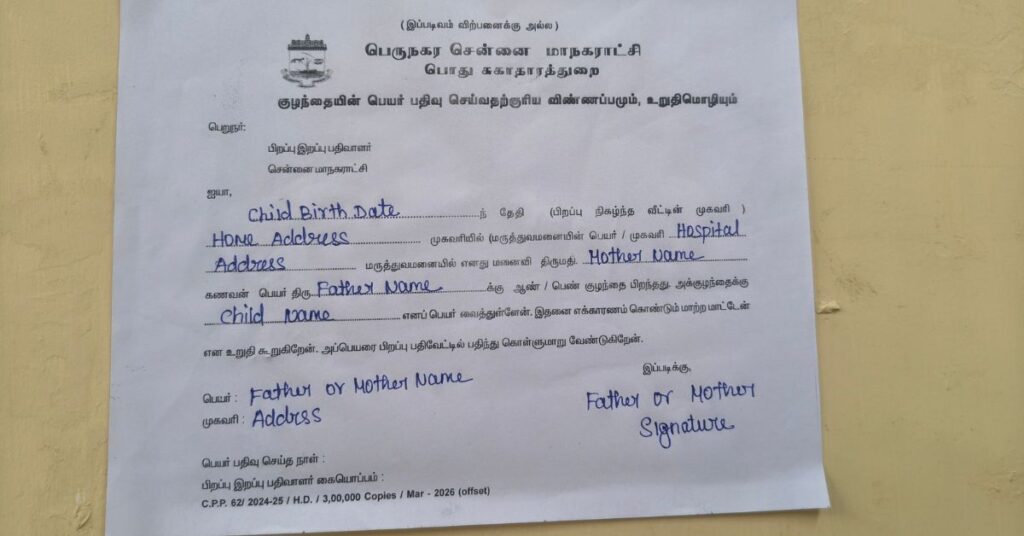
Inside the office, head to the separate Birth & Death Certificate section. At the Royapuram branch, they don’t give out fresh forms directly. Instead, they hand you a master sample and ask you to take a photocopy (xerox) of it nearby before filling it out.
The form requires basic, straightforward information:
- Baby’s date and place of birth
- Current residential address
- Full names of the father and mother
- The chosen child’s name
- Parent’s mobile number and signature
The “Initial” Trap: A Mistake to Avoid
While waiting, I saw several parents getting turned away or having to restart the process simply because they forgot to include the baby’s initial on the form.
Always double-check your spelling and ensure the initial is clearly written. If a certificate is generated with a typo or a missing initial, fixing it later becomes a completely separate, time-consuming legal process. Getting it wrong now will create major hurdles later when you apply for your child’s:
- School admissions
- Passport applications
- Identity cards
Documents to Submit
Once the form is filled, you need to hand over the following paperwork:
- Downloaded Birth Certificate: One printed copy from the GCC portal (manually write the baby’s name clearly in the blank “Child Name” field).
- Father’s ID Proof: One photocopy.
- Mother’s ID Proof: One photocopy.
The Outcome: The officer will verify your documents, stamp the form, and hand you a small acknowledgment slip. The official update usually takes about one month, after which the fully updated birth certificate is ready to download online.
Part 2: Fixing Spelling Mistakes on a Death Certificate
Because hospital data entry is often rushed, typos frequently slip into death certificates—typically in the deceased person’s name, parent’s name, or spouse’s name. In my case, there was a minor spelling error in the deceased person’s wife’s name. Because she was elderly, her son visited the office on her behalf to get it corrected.
Supporting Documents Needed
The verification officer explained that corrections are straightforward if you can present solid supporting ID proofs that display the correct names and establish the proper family relationship. Since older generations rarely have birth certificates, we successfully used:
- Official Passport (listing the correct parental names)
- Smart Ration Card (showing the correct spelling and spouse connection)
- The original incorrect GCC Death Certificate copy
- Children’s ID proofs (as secondary verification)
Writing the Request Letter
You cannot just tell the officer what needs fixing; you must submit a formal written request letter.
If you don’t know how to write one, don’t worry. Right outside the Royapuram office, there are 3 to 4 professional letter-writing assistants. We handed them our documents, explained the typo, and they drafted a perfect formal letter in less than 5 minutes for a standard fee of ₹50.
The Outcome: After reviewing the letter and supporting IDs, the officer stamped and signed a copy of the incorrect death certificate to serve as our official submission receipt. The correction process typically takes 2 to 4 weeks to reflect on the online portal.
Smart Commuter Tips for Your Visit
Your experience will entirely depend on the hour you walk through the door.
- Peak Hours (11:00 AM – 1:00 PM): When we visited at midday for the death certificate correction, the office was heavily crowded, resulting in long waiting lines.
- Off-Peak Hours (After 3:00 PM): When I went back at 4:00 PM for the birth certificate task, the room was almost empty, and I completed the entire submission in a few minutes.
Quick Reference Guide
- Office Timings: 10:00 AM to 5:00 PM (Staff observe a strict lunch break between 1:00 PM and 2:00 PM).
- Facilities: The Royapuram Zonal Office features a dedicated two-wheeler parking area and public restrooms.
- What to Pack: Always carry your own blue or black pen, and bring a small folder with at least two extra photocopies of all your original identity documents.
Important Note: There are absolutely no government processing fees for either baby name inclusion or death certificate spelling corrections. Aside from loose change for photocopies or the independent letter-writer outside, you should not be paying anyone at the counters.
Accessing Other GCC Portal Features
Want to avoid traveling to the zonal office altogether for other municipal tasks? Check out our comprehensive guide on Greater Chennai Corporation Online Services: Pay Tax, Download Certificates & Apply Online to learn how to manage property tax payments, track corporate applications, and handle basic municipal requests right from home.


Pingback: Greater Chennai Corporation Online Services – Bill Payment, Birth & Death Certificate Download Guide